dist
distribution
前端工程师推荐连结
Vue.js Developers
专门刊载一些Vue的文章
Hackr.io
收集各种前端教学,依照语言分类
Tools for Web Developers
一些开发工具介绍
Smashing Magazine
网页开发
Vue.js笔记本
Vue.js 測試的pen:
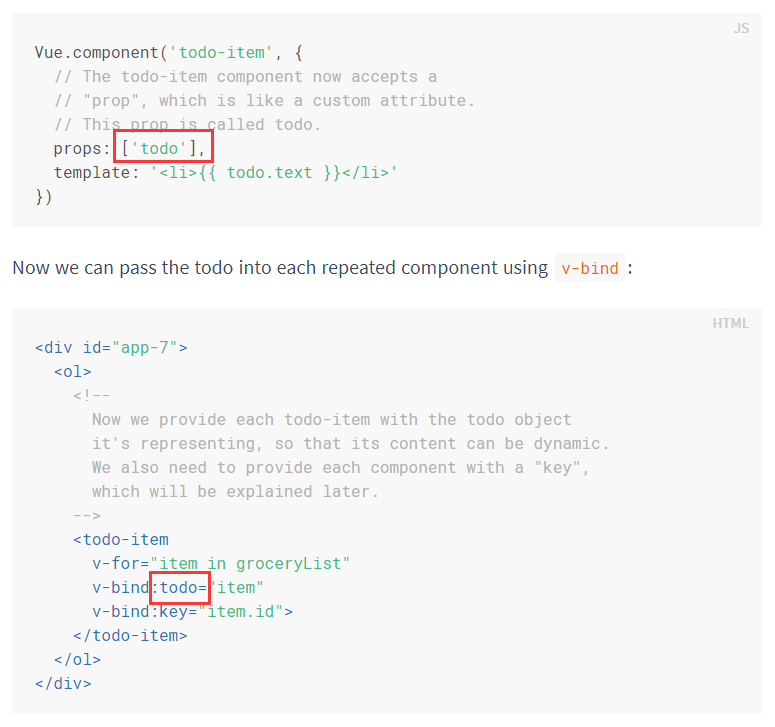
要給Vue的component一些動態資料的話,就給它挖個洞,讓它能接受自己定義的屬性(props)
【directive】
Directives are prefixed with v- to indicate that they are special attributes provided by Vue.
v-for
used for displaying a list of items using the data from an Array
v-if=”seen”
如果seen是true的話,這個元件就是可見的
v-bind:xxx=”xxxx”
可以綁定為vue裡的資料,例如
v-bind:title="message"
v-on:click=”methodName”
绑定点击功能
v-model
感覺就像是一個model,原型,資料的來源,大家要跟從牠(因為是model,偶像,可以查查這個英文單字,它也有模範的意思。)可以綁在input上。
v-once
值是固定的,以後不會再變了,例:
<span v-once>This will never change: {{ msg }}</span>v-html=”xxxx”
若要打html的時候,可以利用這個引擎
xxxx是自己定義的html
code pen
搜尋radio
Laragon
Laragon
https://laragon.org/
假如Auto Virutal Hosts不能用,就是因为chrome把dev的网址误判之类的,把它的网址改名就好了。例如改成:{name}.luna
前端工程師點擊技能
- GIT
- React
- Vue.js
- GA
- Chrome Devtools
- Webstorm
- Laragon
- GitKraken
- npm
- webpack
- gulp
- Node.js
後端PHP &Laravel
熟悉ES6, ES7語法
IoT相關經驗
Docker Container(AWS ECS)
Chrome DevTools
https://developers.google.com/web/tools/chrome-devtools/
GitKraken
https://www.gitkraken.com/
官方教学
Atlassian Git Tutorial
https://www.atlassian.com/git/tutorials
React
Hello World – React
Meet WebStorm
https://www.jetbrains.com/help/webstorm/meet-webstorm.html
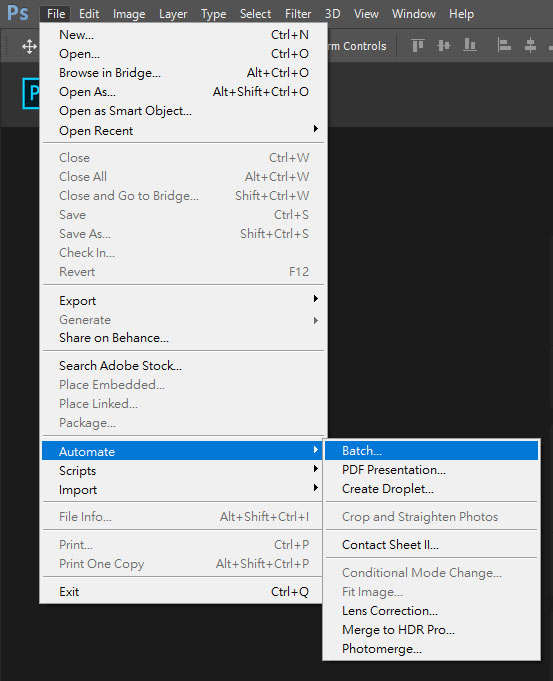
Photoshop圖片批次處理

Animate.css的用法
1.载入cdn
<link rel="stylesheet" href="//cdnjs.cloudflare.com/ajax/libs/animate.css/3.5.2/animate.min.css">
2.加上class名称
animated bounceInDown
大功告成!!
范例:
幹他媽的wordpress掛掉
我的wordpress,就是這個站,竟然掛了,後來自己google找出解決辦法了,參考這一篇
http://www.wpbeginner.com/wp-tutorials/how-to-fix-the-internal-server-error-in-wordpress/
原來是套件有問題,把套件資料夾rename就馬上能連了,頭暈啊😂😂
jQuery实用代码段
此段可用於tab分頁、篩選照片
$(".liveback__buttonlist li a").click(function(){
    $(".liveback__buttonlist li a").removeClass("active");
    $(this).addClass("active");
    var showgirl = $(this).data('type');
    $(".liveback__gallery a").hide();
    $(".liveback__gallery a[data-type='" + showgirl + "']").fadeIn(200);
});
//点哪里滑到哪里
$("#headergifmenu > li > a").click(function () {
    var eventType = $(this).attr("data-type");
    var target = $(".wrapagentall").find(
        "[data-type='" + eventType + "']:first");
    var targetOffset = target.offset().top - 180;
    if (target.length) {
        $("html,body").animate({scrollTop: targetOffset}, 1000);
        return false;
    }
});
onclick連結另開分頁
onclick="window.open('http://us.yahoo.com', '_blank');"
動態附加元素綁定事件
$(document).on("click", ".btn-list", function () {
});
針對動態附加的DOM元素需要這樣寫